Streamlit apps for analytical workbenches

At some point you might realize that you want to extend the work you do on the data platform and deploy streamlit app. We suggest using our solution for the smooth AWB Streamlit app deployment.
Why should you choose Streamlit app?
- Version control, continuous improvement of data analysis models or algorithms
- Agility in data analysis workflows
- Streamlit apps can handle large volumes of data and cache it
- Real-time, dynamic visualizations of data analysis results
- Streaming apps can be combined with machine learning algorithms to perform real-time predictive analytics on data streams
In this solution, individual app deployments share an Azure AD application for authentication and reuse cloud resources (key vaults and databricks SQL warehouses) already created for the analytical teams as part of their onboarding to databricks.
Architecture of the solution
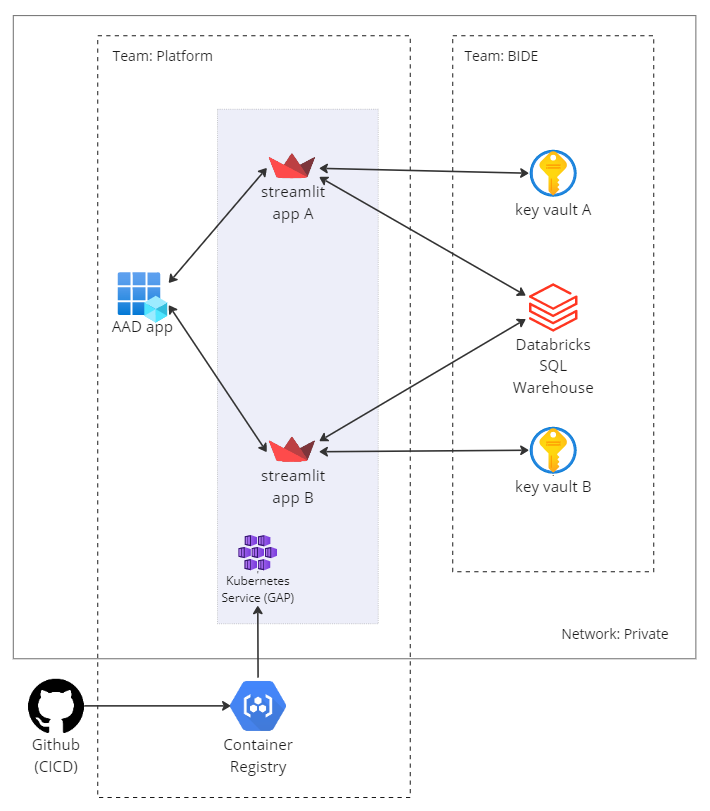
You can read more about High Level Design by clicking on the link.
Instructions on how to deploy Streamlit apps to an existing K8S setup (BIDS) in private network
- Create an app in the ArgoCD repository in applications/apps-int-prod/templates/team-bi-data-science subfolder. You can use actfunc-recalculation-app as a reference.
- Create your own app kubernetes manifest. This needs to be done in bids-kubernetes-manifests repository under
- apps/<your_app_name>/template.libsonnet
- apps/<your_app_name>/<test/prod>/app.jsonnet Template to use can be found at libsonnet-template, you can refer to actfunc-recalculation-app as a reference and change parameters where needed. Make sure a dummy params.json file is copied from the for instance the folder to the test/prod folder of your app. They need to exist in the same folder as the app.jsonnet file. The params.json file is used to pass parameters to the app.jsonnet file during deployment and will be overwritten on your first deployment.
- Add app redirect URI in terraform-common-aad repository. Place it at bids-streamlit-apps in
environments/<test_bi/prod_bi>/team_bi-data-engineer.tf under single_page_applications.
- You can find the redirect URI in the ArgoCD application you created in step 1.
- See this URI sample PR for inspiration.
- Create a deployment to test/prod AKS GitHub action in the application repo. Refer to actfunc-recalculation-app GitHub release.yaml action for reference (normally, only environmental variables needs to change)
- Copy the .streamlit config folder from a deployed to k8s Streamlit app (example) to your app and adjust it to your needs.
- Inside the app repository, create authentication & authorization component using msal_authentication library
(refer to the auth-example in actfunc-recalculation-app).
- for app to be authorized this way, you need to find your AAD role/group of your AWB, with which you gain access to the app. Add its Object Id as your env variable. Also, do not forget to request access for it in myaccess-page.
- Required credentials to your repository:
- Add ACR (Azure Container Registry) push client ID through the terraform-github-repo-credentials repository
- Add the BI_DATA_SCIENCE_KUBERNETES_MANIFESTS_TOKEN GitHub secret
- If your app uses the Databricks SQL package, also add the BI_DATA_SCIENCE_DATABRICKS_SQL_TOKEN GitHub secret
- See the secrets and ACR sample PR for an example